

AI is a tool to support your expertise, not replace it. Whether you are AI-Empowered or prefer an AI-Free classroom, the goal is to lead with transparency so students understand the why behind your choices.
| Category | Use (Aligns with Values) | Caution (Check/Verify) | Don’t Use (Risk to Integrity) |
|---|---|---|---|
| Instruction | Brainstorming creative analogies or “distractor” options for quizzes. | Generating full lectures. Always review for “hallucinations” or bias. | Presenting AI content as your own without a TRUST disclosure. |
| Productivity | Drafting email templates, newsletters, or meeting agendas. | Summarizing transcripts (ensure no private student data is included). | Automating empathy. Don’t use AI to handle sensitive student crises. |
| Assessment | Creating rubrics or “generic” feedback examples to show the class. | Using AI Detectors. They are often unreliable and can lead to false accusations, especially for multilingual and neurodiverse learners. | Allowing AI to assign final grades without your direct review. |
TRUST
The TRUST framework isn’t just for students; it’s a professional standard for how we model responsible AI use in our own work.
| Letter | What it means for you | Faculty Example |
| T – Tell | Be transparent about when and how you used AI to create course materials. | Add a process note to a handout: “I used AI to help brainstorm these discussion questions”. |
| R – Review | Fact-check everything. AI can “hallucinate” fake citations or biased data. | Verify that every source or math problem generated by AI is accurate before showing it to students. |
| U – Use Judgment | Retain your authority. AI can suggest wording, but you decide what is pedagogically sound. | Use AI to draft a rubric, but ensure the critical thinking markers align with your specific expertise. |
| S – Safeguard | Support real learning. Use AI to enhance instruction, not to shortcut your engagement with students. | Use AI to summarize a long department report, but write your own personal feedback for student essays. |
| T – Treat IP with Respect | Respect ownership. Be mindful of copyright when uploading external materials into AI tools. | Avoid uploading a colleague’s unpublished research or a student’s creative work into AI without permission. |
Trust and Faculty Use
Showing students your process builds a culture of honesty and Compassion.
- The Process Note on a Quiz: “I wrote these questions myself, but used AI to generate the incorrect ‘distractor’ options. I reviewed these for logic to ensure they are plausible.” (Blue/TRUST).
- A Note on Clinical Scenarios: “I used AI to generate the initial patient history for this week’s lab, but I spent two hours rewriting the dialogue to ensure it sounds like a real patient in our Central Texas community.” (Green/TRUST).
- Instructional Excellence: By being open about your tools, you model the professional integrity required for our shared future.
Sample Transparency Statements
You can copy and adapt these to fit your course. These statements model transparency for your students.
How I (the Instructor) Use AI
Option: The TRUST Model (General AI Use)
“In this course, I may use AI to help brainstorm assignments or visualize complex concepts. When I do, I follow the TRUST framework: I Tell you where it was used, Review it for accuracy, and use my own Judgment to ensure it meets our high academic standards. AI is my assistant, but I remain the primary architect of your learning”.
How YOU (the Student) May Use AI
Option: Guided Use (The Centaur – Green)
“I encourage you to use AI as a learning partner for brainstorming or clarifying topics. However, I expect you to apply TRUST: disclose your AI use in a brief note, verify all facts, and ensure the final analysis is your own. Using AI to ‘ghostwrite’ your work skips the ‘mental reps’ you need to succeed in this field”.
Before applying TRUST, remember the foundational boundary: Protect student privacy.
- Use Public Data Only: Only input information that is already public.
- ACC’s Approved Tool: Google Gemini is the approved platform. Our contract ensures your emails and student records are not used to train the AI.
- Protect Private Data: Never input student records, names, or private correspondence into any AI tool.
The Collegewide AI Strategic Planning Committee came up with guidelines to help you draft a syllabus policy. These policies are required for all faculty to include in their syllabi.
You should also have frequent, informed, and honest conversations with your students about AI use in your discipline, in education, and in the workforce. These types of honest conversations can help faculty head off issues before they arise by offering an opportunity to share your thoughts with students, and to hear their perspectives, as well.
At ACC, we address violations of instructors’ AI policies using the Academic Integrity process.
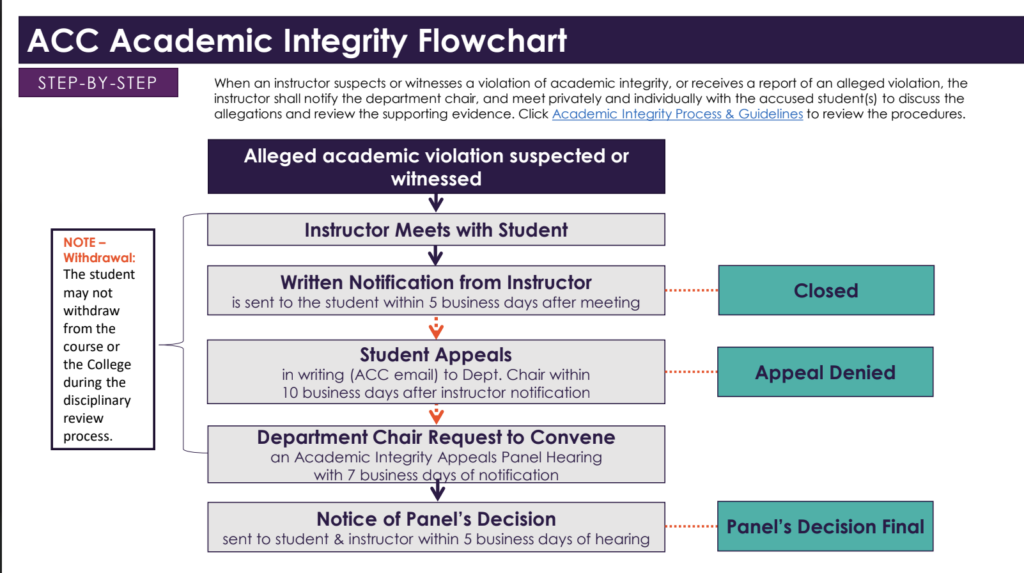
Before you get there, though, we highly recommend using perceived violations, especially first instances, as a teaching moment. Having discussions with your students about your AI policies and the reasons behind your choices are a critical first step–and these should happen throughout the semester, not just when you hand out your syllabi.
The Peace and Conflict Studies center offers training to help faculty approach conversations like these with clarity and an eye to social transformation.