

What do I need to know about AI as a student?
At Austin Community College, we are guided by core values: Courage to lead in a new landscape, Compassion for our community’s needs, and the Joy of creating meaningful learning opportunities. Our commitment to you is to keep AI use ethical, transparent, and student-centered.
This guide helps you navigate how AI fits into your education and how you can use it to level up your skills for the future.
Why do different professors have different policies?
You might notice that every class at ACC has a different AI policy. One professor might encourage it, while another asks you not to use it at all. This is because of Academic Freedom.
- Expertise-Driven: Faculty are the primary architects of your learning experience. They choose the tools that best help you master a specific subject.
- The Syllabus is Your Map: Your instructor’s AI policy will be documented clearly in the syllabus.
- A Professional Skill: In your future career, every employer will have different tech policies. Learning to navigate and respect these different classroom rules is a great professionalism skill that will benefit you long after graduation.
- Start a Conversation: If you have questions about a policy, talk to your professor. Academic freedom is a reciprocal agreement: faculty have the freedom to teach, and you have the freedom to learn.
How can I understand my professor’s policy?
Your professor’s AI policy should include, at a minimum, the following categories:
- Introduction – Introduce your policy on GAI use in the course
- Rationale – State why and under what circumstances GAI is prohibited/permitted/required to be used in the course
- Definition of GAI – Define what GAI is in the context of the course
- Resources – In courses that permit or require GAI, provide resources that guide students on how to properly use GAI in the course
- Assessment – In courses that permit or require GAI, clarify if and how its use will be assessed in the completion of activities
- Penalties – Clearly state the consequences of violating the GAI policy
- Exceptions – Explain any conditions under which there may be an exception to the GAI policy in the course
- Usage Permissions –
- Prohibited – Clearly state what GAI activities are not allowed
- Permitted – Clearly state what GAI activities are allowed
- Required – Clearly state what GAI activities are required
To make policies easy to understand, some faculty use the AI Use Rainbow.
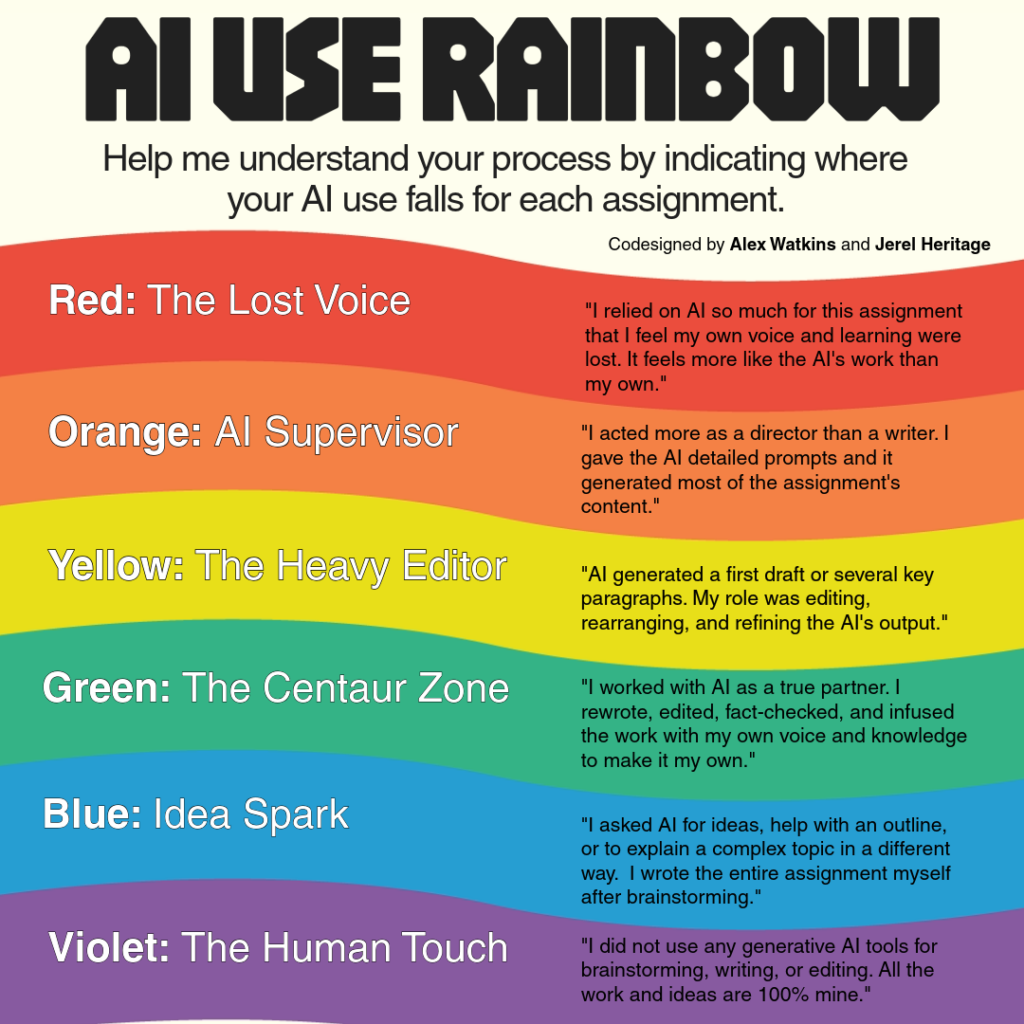
Your syllabus or assignment instructions might point to one of these colors to tell you what is allowed.
- Violet: The Human Touch – All work and ideas are 100% yours. No generative AI tools are used for brainstorming, writing, or editing.
- Blue: Idea Spark – You ask AI for ideas, help with an outline, or to explain a complex topic in a different way. You write the entire assignment yourself after brainstorming.
- Green: The Centaur Zone – You work with AI as a true partner. You rewrite, edit, fact-check, and infuse the work with your own voice to make it your own.
- Yellow: The Heavy Editor – AI generates a first draft or key paragraphs. Your role is editing, rearranging, and refining the AI’s output.
- Orange: AI Supervisor – You act as a director. You give the AI detailed prompts and it generates most of the content.
- Red: The Lost Voice – You relied on AI so much that your own voice and learning were lost. It feels more like the AI’s work than your own.
How can I use AI responsibly
When AI is allowed, use the TRUST framework to ensure your work remains honest and high-quality.
- T – Tell Where AI Was Used: Be transparent. If AI helped you outline or revise, include a short note like: “I used AI to help generate an outline, then wrote and revised the paper myself.”
- R – Review Outputs: AI can be wrong or biased. Always fact-check citations and information. If AI gives you a source, verify it exists before you use it.
- U – Use Your Own Judgment: AI is a support tool, not a replacement for your brain. You are responsible for the final result and the decisions made in your work.
- S – Safeguard Integrity: Use AI to support learning rather than shortcut it. Don’t use it to bypass the “mental reps” required to actually learn the material.
- T – Treat IP with Respect: Respect copyright and the work of others. Don’t upload someone else’s original writing or art into an AI tool without permission.
Check out our responsible use guidance to make sure you’re aligned with AI policies at ACC.
How can I use AI to level up my work?
In classes where AI is encouraged, these tools can help you boost your creativity and productivity:
- The Personalized Tutor: Ask AI to “Explain the Observer Effect in physics using a sports analogy” to help you grasp a tough concept.
- The Coding Coach: Use it to find a bug in your code and ask it to explain why the error happened so you don’t repeat it.
- The Professional Roleplayer: Ask AI to “Act as a hiring manager for a graphic design firm and mock-interview me for an internship.”
- The Design Partner: Use AI to brainstorm visual concepts for a marketing project or to help draft “distractor” options for a peer-review quiz you are building.
Your Future is Human-Focused
At ACC, our goal is to ensure the pursuit of knowledge is never stifled, but always driven by the brilliance and bravery of our community. By using AI with TRUST and following the Rainbow, you ensure your education is rigorous, honest, and transformative.
Back to Top